
There are two ways to issue new or replacement key fobs to members. One way is for the membership secretary to "program" each new fob individually for each member, then deliver that specific fob to the member. The other way is self service.
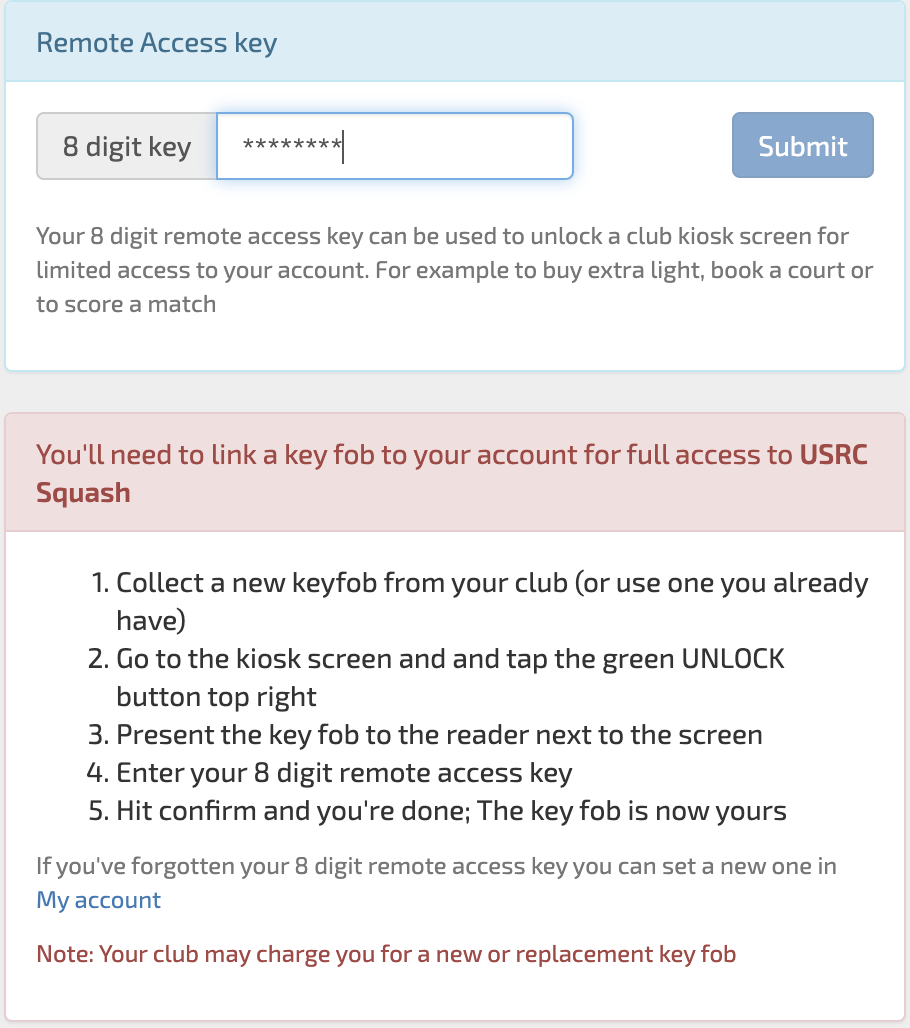
Self service is far less administration for the club and is the recommended way. To do this, locate a stash of unallocated fobs at a suitable point-of-sale in the club (typically a bar). When a member needs a new or replacement fob they come to the bar and ask for one (or buy one if the club intends to charge for them). The member then has a simple procedure to link that fob with their account at the club kiosk screen. This procedure is made clear on their ManageMyMatch logon and involves them presenting the fob to the kiosk card reader and then entering their 8 digit remote access code.
Members without a key fob will get this message on their home page:

When they click into My account they will see these instructions:
If the self service model is not used, then the procedure is somewhat more laborious. The member needs to ask for a new fob from the membership secretary who must then obtain the physical device from their store, note the unique identifying number on the fob and enter it against the members record in the Manage Members section of ManageMyMatch. Then that fob must be delivered to the member in person or by marked envelope.
Members will be given a clear indication to obtain a fob if one is not set up for them with instructions on how to do this within ManageMyMatch. However, this messaging is only presented if the club explicitly wants this. This can be switched on in Manage Clubs by selecting the "Guide members to self serve for key fobs" option.
Comments
0 comments
Please sign in to leave a comment.